Subtitle Animation to Video
Create dynamic, animated subtitles for your videos. Enhance viewer engagement with stylish motion captions using Virdit.
Upload Media File
Drag and drop your file here, or click to browse
Turn Subtitles Into Eye-Catching Animations Virdit Stylish, Smooth, and Flexible
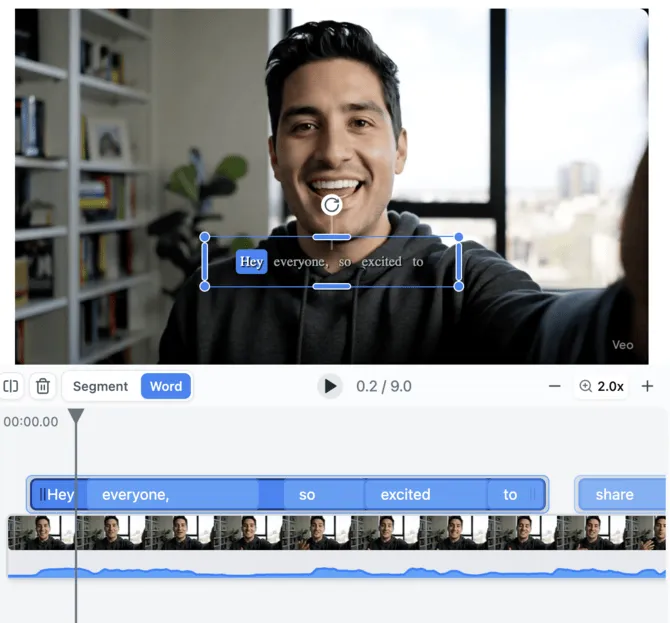
Customize animations, fonts, positions, and colors to match your video’s style with just a few clicks.
Import Subtitles
Upload an SRT, VTT, or use auto-generated captions.
Choose Animation Style
Select from presets like fade, pop, bounce, typewriter, or customize your own.
Adjust Style & Position
Set font, size, color, and placement to fit your video aesthetic.
Preview Animations
See how your animated subtitles will look before rendering.
How to Animate Subtitles with Virdit
1️⃣Upload or Auto-Generate Subtitles
Start with an existing subtitle file or use Virdit to transcribe.
2️⃣Customize Animation & Style
Choose animations, font styling, and layout options.
3️⃣Export Animated Video
Burn the animated captions into the final video or export as layers.
Why Animate Subtitles with Virdit?
Visually Appealing
Keep viewers engaged with eye-catching motion effects.
Fully Customizable
Edit every aspect — text, position, animation, and layering.
Multi-Track Ready
Supports translation, emoji, and multiple subtitle types.
High-Quality Export
Render crisp videos with baked-in animated captions.
Use Cases
Social Media Creators
Create engaging reels and shorts with bold animated captions.
Educational Content
Highlight key terms and concepts with styled animations.
Music Videos & Lyrics
Add synced, stylish lyrics to music videos.
Marketing Videos
Animate subtitles to drive attention to key messaging.
Multilingual Presentations
Add multiple language subtitle layers with custom animations.
Reward per subscription
$5+ 400 credits
Share and Earn Credits and Money!
Share this link anywhere — on social media, email, or messaging apps — and earn free credits plus real cash when new users subscribe!
Your Referral Link
Each new subscription via this link rewards you $5 + 400 credits
https://www.virdit.com/video-edit/subtitle-animation-to-video
Login to get your personal referral link and start earning rewards
Enhance your video with powerful animated subtitles - that elevate engagement and clarity.
Animation Presets
Fade, pop, bounce, typewriter, and more.
Editor Tools
Fine-tune each segment’s animation and timing.
Style Controls
Font, size, color, stroke, background, and layout.
Video Rendering
Final export with animated subtitles baked in.
Frequently Asked Questions
Yes, you can define custom animations for each subtitle segment.
SRT, VTT, and ASS are fully supported.
Yes, you can animate emojis and insert diagram overlays.
Absolutely! You can see your animation before exporting.
Yes, you can animate and stack multiple tracks like translation, captions, or emojis.
Basic preview is free. Rendering the final video uses credits.